
Deployable Agent Teams
From micromanaging AI interns to coordinating agent teams

Last week Claire Gouze at Nao and I were commiserating over the same grind: managing our AI interns.
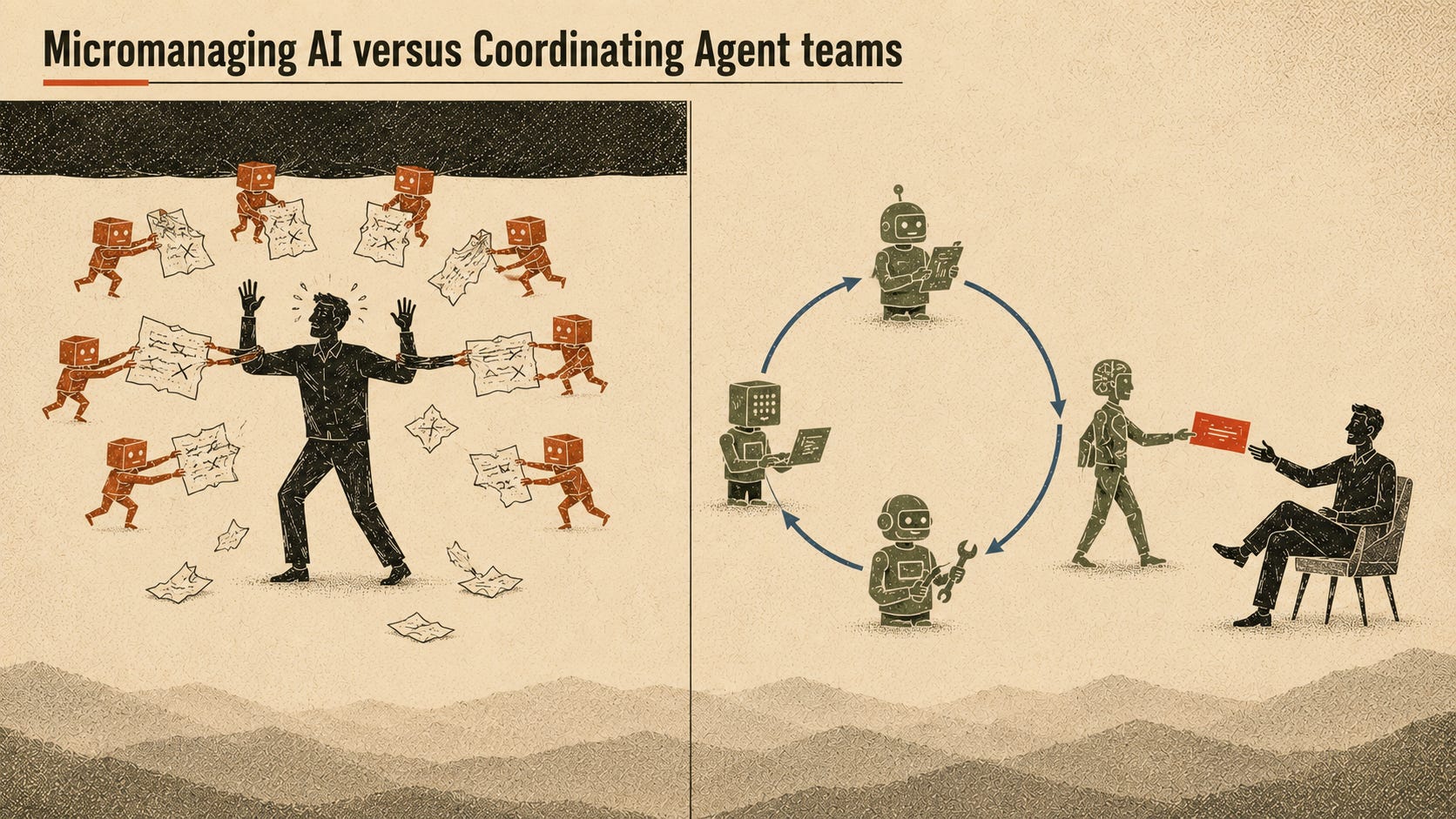
I think we’ve all been there. We build dozens of agents as skill files in claude code, set them on routines or direct them with goals or loops, and then spend hours cycling through endless terminal windows managing their work.
When we started building with AI, we saw big productivity boosts from using these primitives. But that magic is quickly morphing into fatigue from driving 10+ Claude sessions in parallel, furiously trying to balance velocity with process and quality.
It’s a noticeable pattern. The throughput goes up. And so does active management. What’s worse, the work doesn’t create compounding value.
Instead, people are hitting the ceiling of steering their agents to get work done.
We don’t feel like superheroes, with a team of agents helping us do work. Instead, we feel like overstressed middle managers, having to follow up with our AI interns, checking their work.
This is because we are still the orchestrator, hand-juggling every agent with almost no process and automation between them.
The next level of agentic work comes from empowering agent teams that run without you at the wheel, like a team of trusted employees with explicit workflows on how to do their jobs, using their world-class intelligence to solve hard problems, and checking in with you when necessary.
The orchestration ceiling
The breakthrough in your AI work comes in the gap between where one person steers an agent vs having a standing team embedded in how your company actually operates.
Most of our agent primitives have steered us towards this orchestration ceiling - loops, goals, skills, etc. These all work great when we’re a conductor for a symphony of agents. But the hard part of being a conductor is that you have to keep directing different parts of the orchestra.
You dispatch the work, you watch the terminal, you catch the drift, you carry the context from one session to the next in your own head.
Because the agent drifts mid-task, you babysit it to make sure it follows every step of the workflow. You have to continuously check in to make sure the agent hasn’t hallucinated another task and lost the thread entirely.
For most people, manual orchestration is how they’re working with AI right now.
Their throughput is up, but their exhaustion is also up.Put simply, it’s micromanaging interns.
Moving towards empowering teams
Armin Ronacher recently described a series of loops for enabling agents to do work in “The Coming Loop”:
Work is put into a queue of sorts, a machine picks it up, attempts it, stops, and then some harness decides whether that was actually the end.
If not, the harness continues the same session, injects another message, starts a fresh session with modified context, or sends the task to another machine.
This is exactly the future of agentic work that enables another level of productivity, and more importantly, respite from the exhaustion of micromanagement.
Instead of actively managing 10 concurrent agent sessions, empowered agent teams work together to complete jobs from a queue.
You have one agent spin up to work on the task, a separate entity to judge if the work is DONE and GOOD ENOUGH, and then the team returns to you (the manager) with the output, or another agent keeps working until the job gets done.
And all of this can be triggered off schedules, events, and ad-hoc messages. It’s work that you delegate to your agent team without you needing to track progress in the terminal or app.
What your harness needs to empower teams
As Armin mentions in his piece, the harness is what helps you drive the agent team. It helps you manage state, context, tools, and orchestration of the team so that you know what jobs need to get done, what a good job looks like, and when that work needs to happen.
I won’t go into the basics of what makes a good harness, lots of people have written about harnesses, what they are, and their importance.
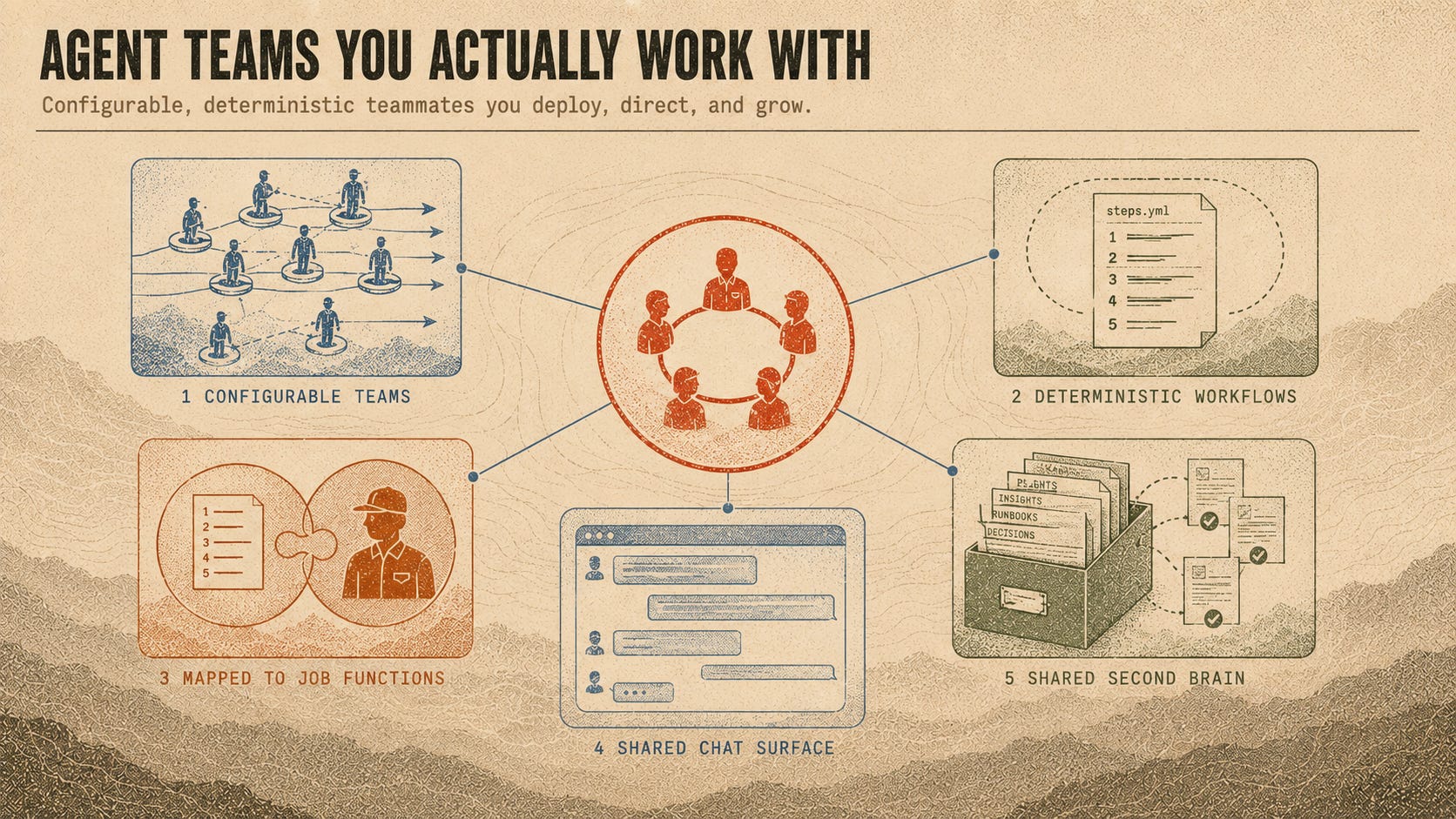
However, in working with our own harness, Bobi, I’ve found a few dynamics that stand out.
1. Configurable teams: this is what separates doing work with agent teams versus simple loop engineering. When you build with a loop, you can have the agent go through the flow and check its work. But when you create a team of engineers, you can dispatch agents to do different jobs in parallel, have them talk to each other to collaborate on work, and get you richer outputs.
On our support team, I run a triage agent for root-cause analysis and an engineering agent that writes and tests the code before it opens a PR. I could merge all of this into a single loop, but I work faster with two separate agents. Sometimes I only need the support agent to investigate issues that are false and sometimes I only need the engineer agent to write code for me.
Having teams be configurable flexible is paramount. If it takes 2 weeks to build a multi-agent system, you run the risk of deploying something that becomes obsolete with every foundation model upgrade.
2. Deterministic workflows the agents must follow: creating workflows in a skills file works, until the work gets complicated. As the context window fills up, you run the risk of the agent getting confused and failing to follow the process.
Declared workflows in something explicit like a YAML file, separates the procedures from the context on how to do the work (your skills). As a result, you can trust that your agent can make the right decisions, check in with you where necessary, and handle work autonomously.
It’s similar to the trust you have as your intern becomes a teammate, when you know they’ll follow the team processes and check in with you when needed.
3. Workflows and agents mapped to the job functions: this is where the first 2 items come together. When mapped to how you expect the team to get work done, you’re creating the environment for complex multi-step work to get done elegantly and reliably.
When your eng agent’s workflows are all the steps in the software development lifecycle, you can trust that it’s doing a good job. Or when your on-call agent follows the team’s runbook and escalation policies, you can have it be your front line worker.
4. A shared chat surface: this is an underrated access model for working with your agent teams. But, when you work with people, you expect to message them in chat, not spin up workspaces with multiple terminal windows or threads in a separate desktop application.
This is a small, but powerful UX change that allows you to delegate work directly from Slack (or your chat app of choice), check in on running jobs, and get messaged when the agent team has automatically done some work for you.
There’s an added bonus here too - the work is publicly accessible by your team of humans. So, your entire org can stay up to date on PRs getting submitted, on-call issues triaged, or support requests investigated.
5. A shared second brain / knowledge base: as time goes on, you want agents that get smarter in ways that are noticeable. You want the agent to be able to reference past work, artifacts, and decisions without you needing to always supply it (or tell it “go find X in google drive”).
The breakthrough I discovered was setting up a second brain and knowledge base next to my agent team, where all files get written out, even if I create an artifact like a google doc. Then, I have all this content indexed for semantic search so that my agent team can refer back to work that’s been completed, research conducted, or snippets of learnings from over time.
There are entire sections of the market now dedicated to building company brains and context layers. When intelligence is a commodity that you can rent from a foundation model, the difference is the knowledge and context you build behind it.
The impact of agent teams
At Moda Labs, we’ve run three agent teams for the last few months and have felt the impact firsthand.
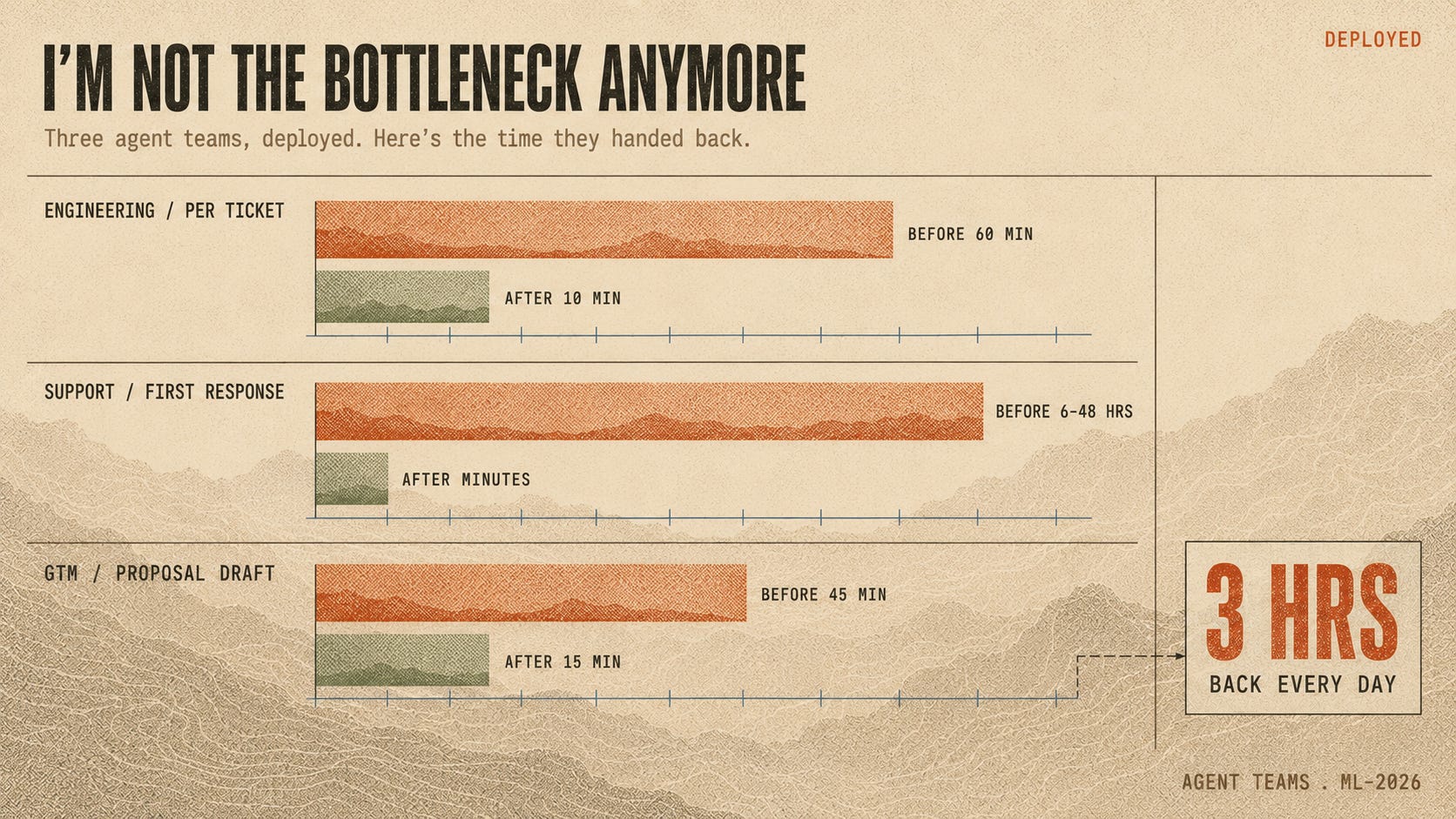
The Engineering Team (60 min → 10 min per ticket)
We have a team deployed and accessible via slack, which can spin up 10 engineers to work on 10 tickets in parallel, following our SDLC and landing PRs with quality code.
The result? 500+ commits in a month, versus a previous ceiling of 200-300, all of it through our process with code review and tests.
Shipping a ticket used to cost 45 to 60 minutes of my time, between kicking off the Claude job, monitoring it, and checking that it followed the process and landed correctly. Now it’s about 10 minutes total, mostly to make sure the design is solid and the PR is clean.
The Support Team (90%+ latency improvement)
We have a support team that gets events from Posthog, where issues surface, and monitors our support inbox in gmail for customer concerns. Issues that require code get passed to the eng team for a PR.
In the past, issues took 30 to 45 minutes to resolve, most of it me hand-copying text from PostHog or Gmail into a Claude Code session and then babysitting the agent.
The uglier number was the latency: 6 to 48 hours to first response, depending entirely on how often I remembered to check the support inbox.
Now a support email gets root-caused within 15 minutes with a PR attached, and I answer the customer almost immediately.
The GTM Team (~3 hours back every day)
We have a go to market team that handles a ton of automation from market research to sales call prep to proposal and customer prototypes.
In the past, prepping and processing sales calls would cost 60 to 90 minutes a day, and I skipped a lot of it, which is a polite way of saying I showed up less prepared than I should have.
Now the daily sales call manager handles call prep through follow-up. Proposals went from about 45 minutes on the old setup to a one-shot draft plus 15 minutes of my time. I tracked the time spent and savings from my new setup and the result was stark - my GTM agent team earns me roughly 3 hours a day.
Running an AI consultancy is an extremely busy job, which means that I don’t have the cycles to conduct deep research, hand write proposals, or even build prototypes for customers. But these are all things that I require so that our company meets a high bar of understanding and execution. I honestly can’t imagine trying to run GTM without my agent team now.
Secondary impact of agent teams
This all sounds great, but managing agent teams to do work comes with new responsibilities. Just ask any person who moved from an IC role into management.
The review seat is the new bottleneck
Look again at that engineering number: 45 to 60 minutes down to about 10. That’s 10 minutes of reviewing work, which shouldn’t be taken lightly.
As the manager of the team, getting clear on the ticket specs and carving out time to review PRs is critical for success. Otherwise, you’ll either end up with an endless queue of PRs that don’t get merged or you’ll start letting slop creep into your codebase.
Managing the team is a job of its own
It’s true that I’ve gained a lot of time back thanks to the work my agent teams can do. It’s also true that I spend a lot more time managing my agent team.
I inspect the AGENT.md, skills, and workflow files to know what I’m architecting, often having to resolve conflicts and errors of processes that I haven’t defined well enough.
I update my agents and their topologies based on how the work is getting done, adjusting how they work and how they work together so the work doesn’t degrade.
In some ways, agents and agent teams are like software of their own - you need to maintain them or else they erode quickly over time.
So what now?
If you’re hitting the ceiling with your personal Claude setups or feeling like there’s another level of AI to unlock, you aren’t alone. This is exactly how I felt after the initial magic of Claude Code wore off earlier this year.
There are some interesting products out there like Dust that can help you quickly get to a deployed agent easily accessible in chat, especially if you’re accustomed to SaaS products and their web UIs.
I’m biased here: we built our own harness, Bobi, to run configurable agent teams for ourselves and our clients. It’s the bet we’re making.
The orchestration ceiling is real, it’s you, standing in the middle of every loop. The next teams to break through will have used their harnesses to empower and coordinate agent teams. They’ll have agents that can amplify their impact, work autonomously, and check in with their managers when it’s necessary.